Customers are the sales engine of your Christmas tree lot. They enter to browse the trees you have made available, choose a tree, complete checkout, and wait for the purchase to be loaded. A successful sale therefore depends on more than attracting visitors: the lot needs visible stock, an open route, a workable price, and enough service capacity to finish the transaction.
The most useful way to read customer activity is as a chain. A customer arriving is only the beginning. If the tree is still in an order or delivery state, it cannot be sold. If the tree is displayed but the route is blocked, the customer may not reach it. If the price feels too high, a shopper may leave without buying. If checkout or loading cannot keep up, a purchase can stall after the customer has already selected a tree.
Customer records and outcomes
The table below groups the customer-related records that matter while you run the lot. These are not separate unlockable customer characters; they describe behaviors, stages, and conditions that help explain why a visitor buys, waits, reviews the lot, or walks away.
| Customer record | What it means | Player check |
|---|---|---|
| Browsing customer | A visitor examines the trees currently offered for sale. | Keep trees visible and leave a route to the display area. |
| Tree purchase | The customer selects an available tree and starts the sales transaction. | Confirm the tree was delivered and placed in the selling area. |
| Price-sensitive shopper | A shopper may reject a price that feels too steep and leave. | Compare sales activity with the current price instead of assuming higher price means higher profit. |
| Customer patience | The amount of waiting a customer tolerates before service delay becomes a problem. | Reduce delays and use current upgrade information when it is available. |
| Checkout | The payment stage that converts a selected tree into a sale. | Keep checkout positions usable and add capacity when queues become a bottleneck. |
| Customer loading | The post-checkout step that handles the purchased tree. | Treat loading as a separate task from payment and keep it staffed or available. |
| Customer review | Feedback left after the customer interaction or sale. | Use reviews as a service signal, not as a confirmed formula for rewards. |
| Customer access | The ability to reach displays and service areas without blocked movement. | Leave open space around trees, facilities, and decorations. |
Use the records as a diagnosis tool. A busy entrance with no completed purchases points you toward stock, access, price, checkout, or loading rather than simply needing more visitors. A customer who buys but leaves a poor review points toward the service experience, while a customer who walks away before choosing a tree makes price and access more important checks.
From arrival to completed sale
Customer sales follow a practical sequence: browse the available trees, choose one, check out, pick up or receive the purchase, and load it. The order matters because each stage depends on the previous one. Placing a tree in storage or ordering it from a supplier does not by itself make it a product a customer can buy. The tree must arrive and be put into the customer-facing selling area.
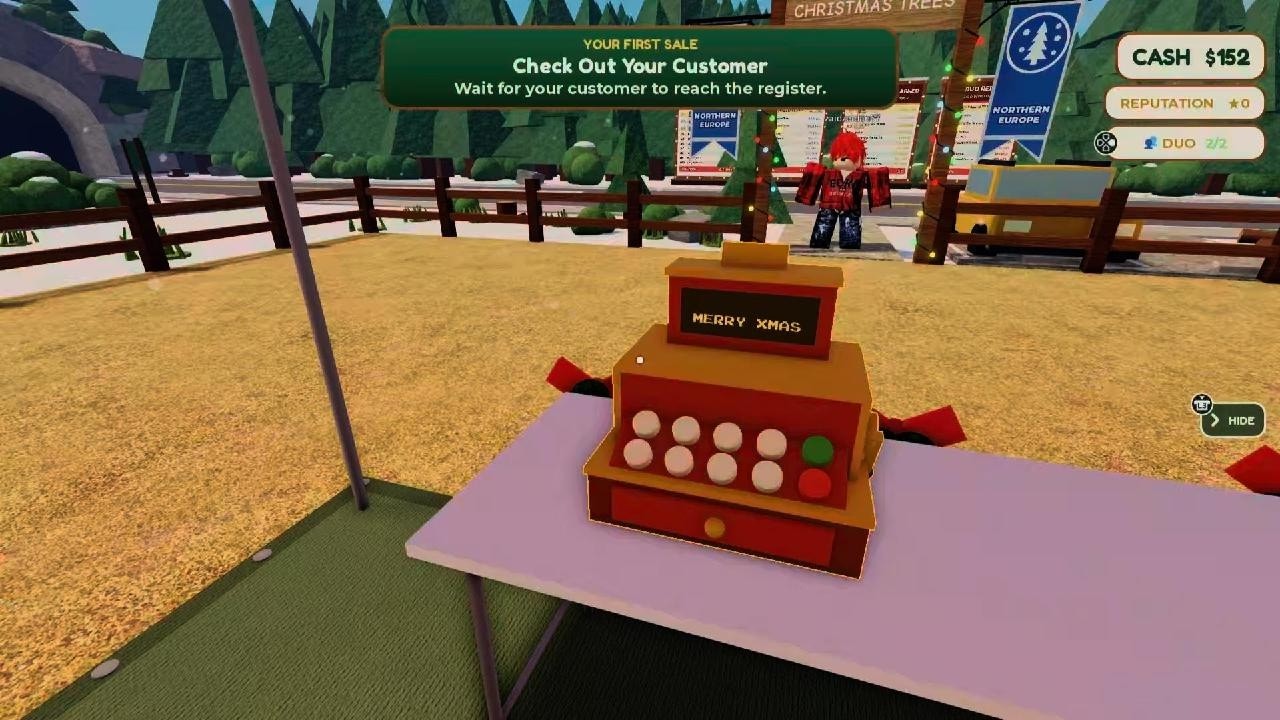
Complete a customer tree purchase
This moment supports the customer-flow sequence from ordering and placing trees through checkout, pickup, and loading the purchase.

After a tree is displayed, give customers room to inspect it. Decorations, benches, lighting, and other lot objects can make the space attractive, but they should not hide the product or interrupt the route. Land expansion can create more room for displays and service points, yet extra space only helps when the new area remains reachable.
Once a customer chooses a tree, checkout becomes the next point of failure. The player can handle the transaction, or a cashier can cover that work when the relevant employee option is available. More checkout stations can improve simultaneous handling, but the exact capacity and upgrade values should be read from the current game interface rather than assumed from the number of visitors.
Loading is a distinct final service stage. A completed payment is not the same thing as a fully finished customer interaction if the purchased tree still needs to be handled. The player can perform customer loading, or a customer-loading worker can take that responsibility. When customers appear to pause after checkout, inspect loading before changing the price or ordering more stock.
Stock, price, and access decisions
The three fastest customer checks are product availability, price acceptance, and access. Start with stock: make sure the tree customers want is ordered, delivered, and placed where they can see and reach it. An order that has not arrived, or stock left outside the selling area, cannot support a purchase even if customers are already inside the lot.
Next, read the price as a trade-off. A higher price can increase the value of a completed sale, but it can also reduce the number of shoppers willing to buy. The customer behavior described for the lot includes budget-conscious shoppers, and a steep price can make them walk away or choose a smaller tree. There is no reliable universal threshold here, so do not treat one price as guaranteed to convert every customer. If visitors are leaving while stock remains available, test a fairer price and compare several sales cycles.
Choose prices for budget-conscious customers
This moment supports the pricing guidance by showing budget shoppers, cheaper tree prices, and a customer choosing a smaller tree within a limited budget.
Finally, inspect access. Customers need a clear path to the displays and service areas. A tree can be technically stocked but practically unavailable when furniture, decorations, or another object blocks the route. Look at the whole path rather than only the checkout counter: entrance, display, payment, pickup, and loading all need to remain usable.
These checks also explain why customer count and Cash income can move in different directions. More visitors do not guarantee more sales. Income rises when customers can find a suitable tree, accept the price, and complete every service stage. Conversely, a smaller flow with reliable completion can be more useful than a crowded lot where customers queue, wait, or leave.
Reviews, patience, and service capacity
Reviews are a visible outcome of the customer experience, but their exact scoring formula and reward effect are not established here. Treat a review as feedback about how the lot is operating rather than as a promise of a particular bonus. If reviews worsen while customers are waiting, check checkout and loading capacity. If they worsen while customers cannot reach displays, correct the layout first.
Customer patience matters because delays can turn a potential sale into a departure. Headquarters upgrades are associated with customer-patience improvements, but the available information does not establish a universal value or a fixed upgrade level. Use the current Headquarters panel for the values in your version. Even with more patience, avoid using it as a substitute for a clear route and sufficient service capacity.
Employees let you separate responsibilities as the lot grows. A cashier can cover checkout, while a customer-loading worker can handle the post-payment task. Other workers may cover stocking or deliveries, which indirectly protects customer flow by keeping the selling area supplied. Hiring only one kind of worker does not remove every bottleneck: a well-staffed checkout can still be slowed by missing trees or unfinished loading.
Checkout stations are another capacity decision. Add them when customers are regularly waiting at payment and the rest of the flow is healthy. If customers are not reaching the counter, more stations will not solve the real problem. Likewise, hiring a loading worker is more valuable when completed purchases are accumulating at the final stage, not when the display is empty.
A practical customer-flow routine
Use this routine whenever sales slow down or customers begin leaving:
- Check the display. Confirm that trees are delivered, placed in the selling area, visible, and not hidden behind lot objects.
- Trace the route. Walk or observe the path from entrance to display, checkout, pickup, and loading. Remove or reposition anything that blocks movement.
- Watch the choice. If customers browse but do not buy, review the current price and whether the available tree sizes or types fit the shoppers arriving.
- Check checkout. If customers have selected trees but payment is delayed, use the available checkout capacity or handle the queue directly.
- Check loading. If payment finishes but the transaction does not move on, perform the loading task or assign the appropriate worker.
- Review the result. Compare completed sales, remaining stock, Cash, and customer reviews across several cycles before making another change.
This order prevents a common mistake: reacting to a symptom with an unrelated upgrade. For example, expanding the lot will not make an expensive tree more attractive, and lowering the price will not unblock a path. Resolve the earliest failed stage first, then observe whether the later stages recover.
Limits of customer information
Customer behavior is partly mutable and partly version-dependent. Exact patience values, customer caps, price thresholds, review formulas, and upgrade costs are not established by the available customer records. The in-game panels should be the final authority for those values when your version exposes them.
The safest strategy is therefore observational. Keep enough stock ready for the next cycle without spending all Cash on inventory. Watch whether customers leave before choosing, after choosing, at checkout, or during loading. Then change one factor—price, layout, staffing, station capacity, or replenishment—and compare the next few cycles. This gives you a better signal than judging the lot from one unusually quiet or busy visit.
This approach also helps when several problems appear at once. Restore a clear route and a sellable display before spending Cash on extra stations. Once customers are reaching the service area, identify whether payment or loading is the slower stage. Only then adjust staffing or capacity. Keeping those observations separate makes it easier to tell whether a change improved completed sales, reduced departures, or merely moved the queue to another part of the lot.
First-time Run a Christmas Tree Lot customer questions
Why can customers arrive without buying a tree?
Arrival does not guarantee a completed sale. Check that a tree has been delivered and placed in the selling area, that customers can reach it, and that the current price is acceptable to the shoppers visiting.
What should I check when a customer stops after checkout?
Inspect the loading stage. Loading is separate from payment, so the player or a customer-loading worker may still need to handle the purchased tree before the interaction is complete.
Where can I find exact customer patience or price values?
Use the current in-game panels, especially Headquarters and Pricing, because the available customer guidance does not establish universal patience values or a fixed price-conversion threshold.